Construction Intelligence,
Mapped.
SiteScope brings public construction records, geographic context, companies, and contacts into one visual workspace—helping teams find relevant opportunities without searching through scattered portals and databases.
Start with an opportunity, an area, or a company.
- Three Independent Intelligence Modules
- Geographic Public-Record Exploration
- Source-Linked Records
- Source-Linked Public Records
- Modular Research Workflows
Public construction information is fragmented.
Important opportunities are distributed across procurement portals, government databases, agency websites, planning records, and other public sources. Finding the right record, understanding its location, identifying relevant companies, and tracking updates often requires several disconnected tools.
Without SiteScope
- Repeated portal searches across disconnected systems.
- Disconnected spreadsheets for tracking what was found.
- Limited geographic context around each record.
- Manually organized deadlines and agencies.
- Separate tools for company and contact research.
- Difficult tracking as public records change.

With SiteScope
- Public records organized in one workspace.
- Geographic opportunity exploration on an interactive map.
- Source and date visibility on available records.
- Saved opportunities and saved geographic areas.
- Optional company and contact research.
- Record-change tracking where supported.
SiteScope organizes public information and supports research—it does not replace professional judgment or eliminate all manual verification.
One visual workspace for construction research.
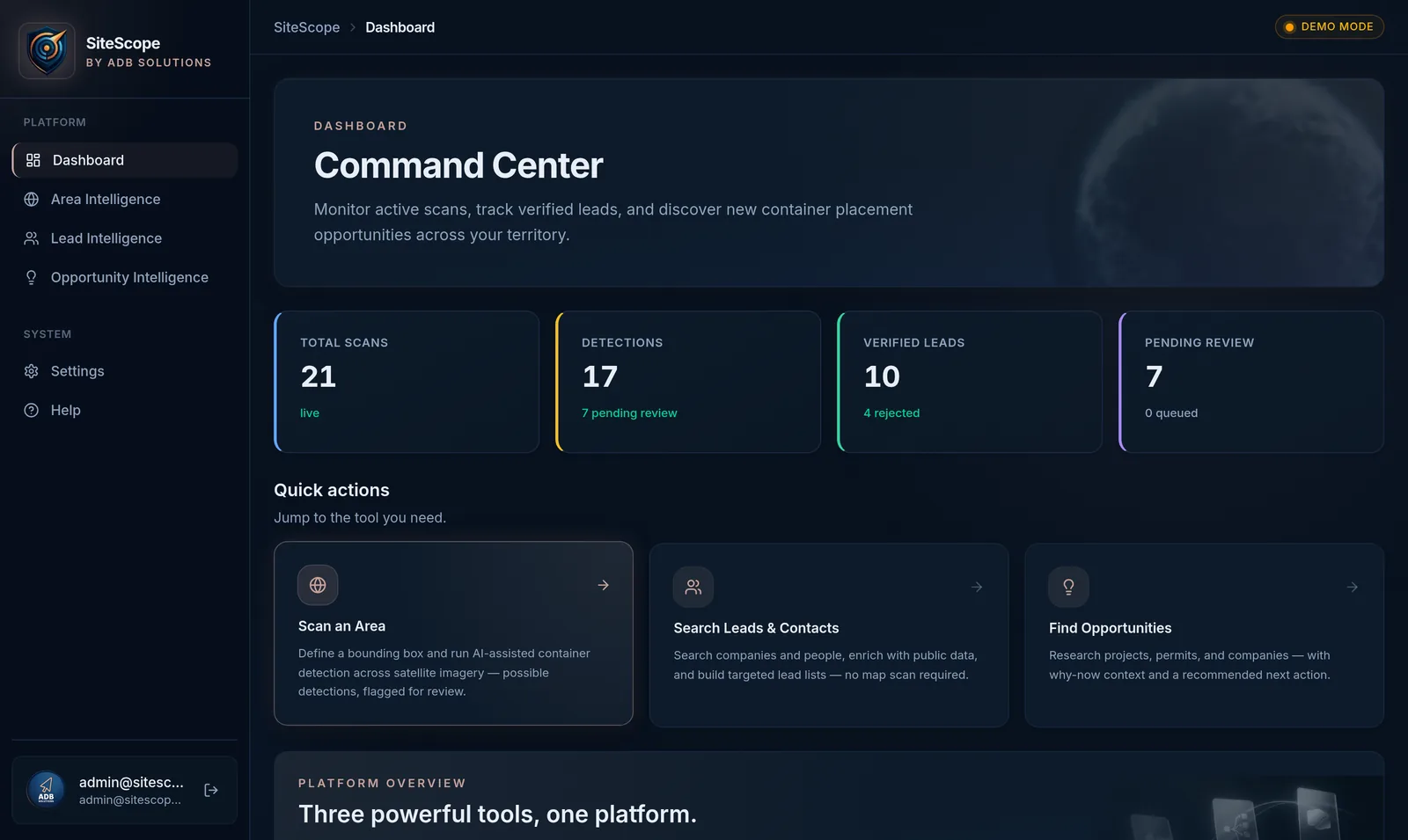
The SiteScope dashboard connects opportunity, area, and lead research in a single interface. Below: the current platform running in Demo Mode.
Three intelligence layers. One connected workspace.
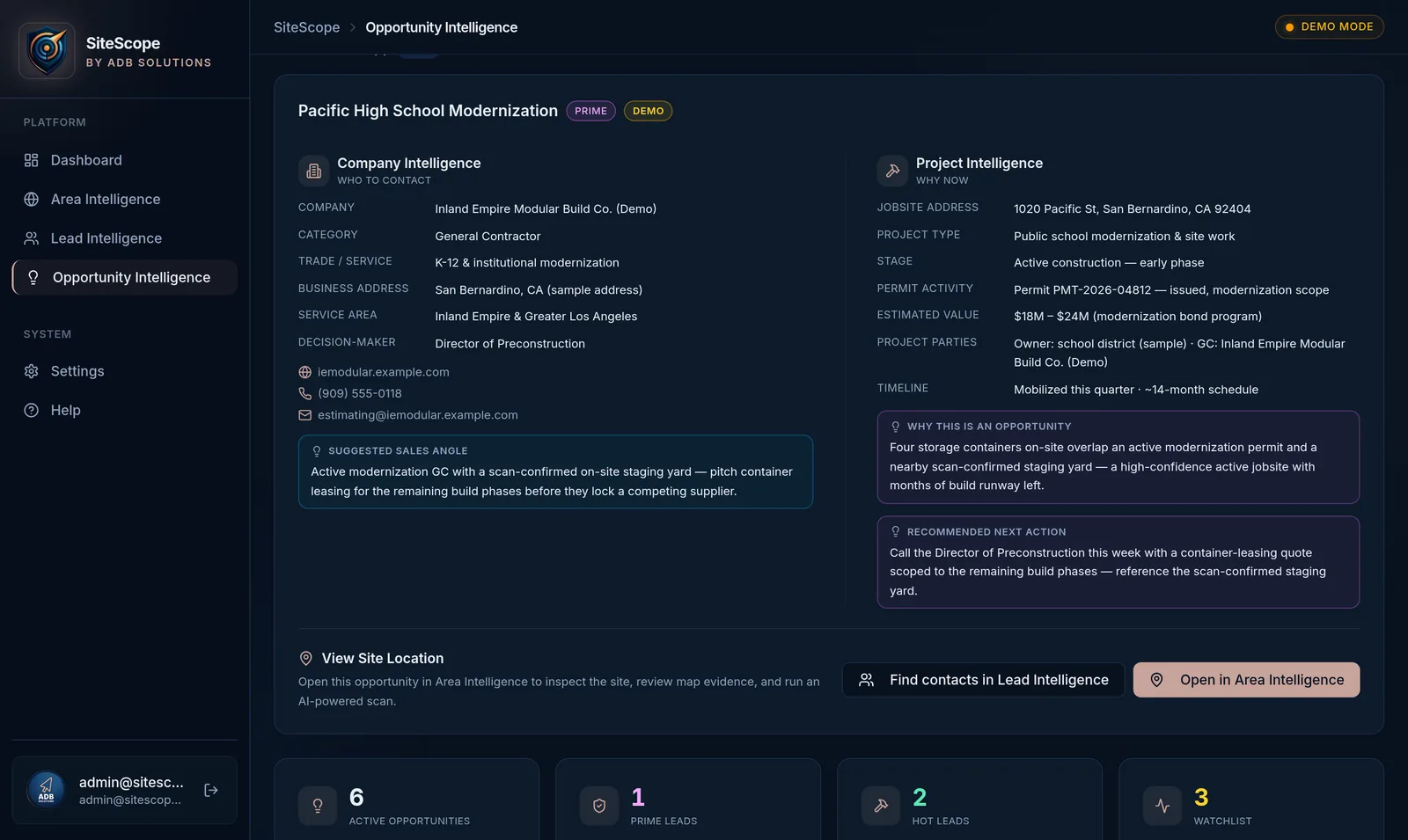
Start with any layer. Connect them when your research requires it.
Each layer is independently usable. Connections between layers are optional—no module requires another.
Roadway Improvements — Package B
Campus Modernization — Phase 1
- Deadlines and agency labels
- Source indicators on records
- Status, stage, and category filters
- Optional: view location, find companies
- Map layers and geographic boundaries
- Saved areas and custom regions
- Public records shown geographically
- Location precision shown on every record (address → county level)
Pacific Site Services
Operations Manager (sample)
- Company cards and contact records
- Industry and geographic filters
- Export actions for available records
- Optional handoffs from other layers
From public record to actionable intelligence.
Every step after the first is optional. Expand a record only as far as your research requires.
-
STEP 01
Discover a public record
Find an opportunity or project record through search, filters, or the map.
-
STEP 02
Understand its location
See the record's geographic location and the surrounding area context.
-
STEP 03
Expand company context
Research companies that may be relevant to the market, project type, or territory.
-
STEP 04
Review available contacts
See business contact information where it is publicly available.
-
STEP 05
Save, export, or keep researching
Save the opportunity or area, export available records, or continue in another module.
Company–project relationships are shown only as research context, not guaranteed connections, unless supported by the underlying public source.
Find relevant public construction opportunities.
Search and organize public construction opportunities using filters such as location, status, stage, category, agency, date, and deadline. Review available solicitation details and return to the original public source when additional verification is needed.
- Geographic and keyword search across public records
- Status, stage, category, agency, and deadline filters
- Solicitation numbers and official source links when available
- Save records, view associated locations, export to CSV
Explore opportunities geographically.
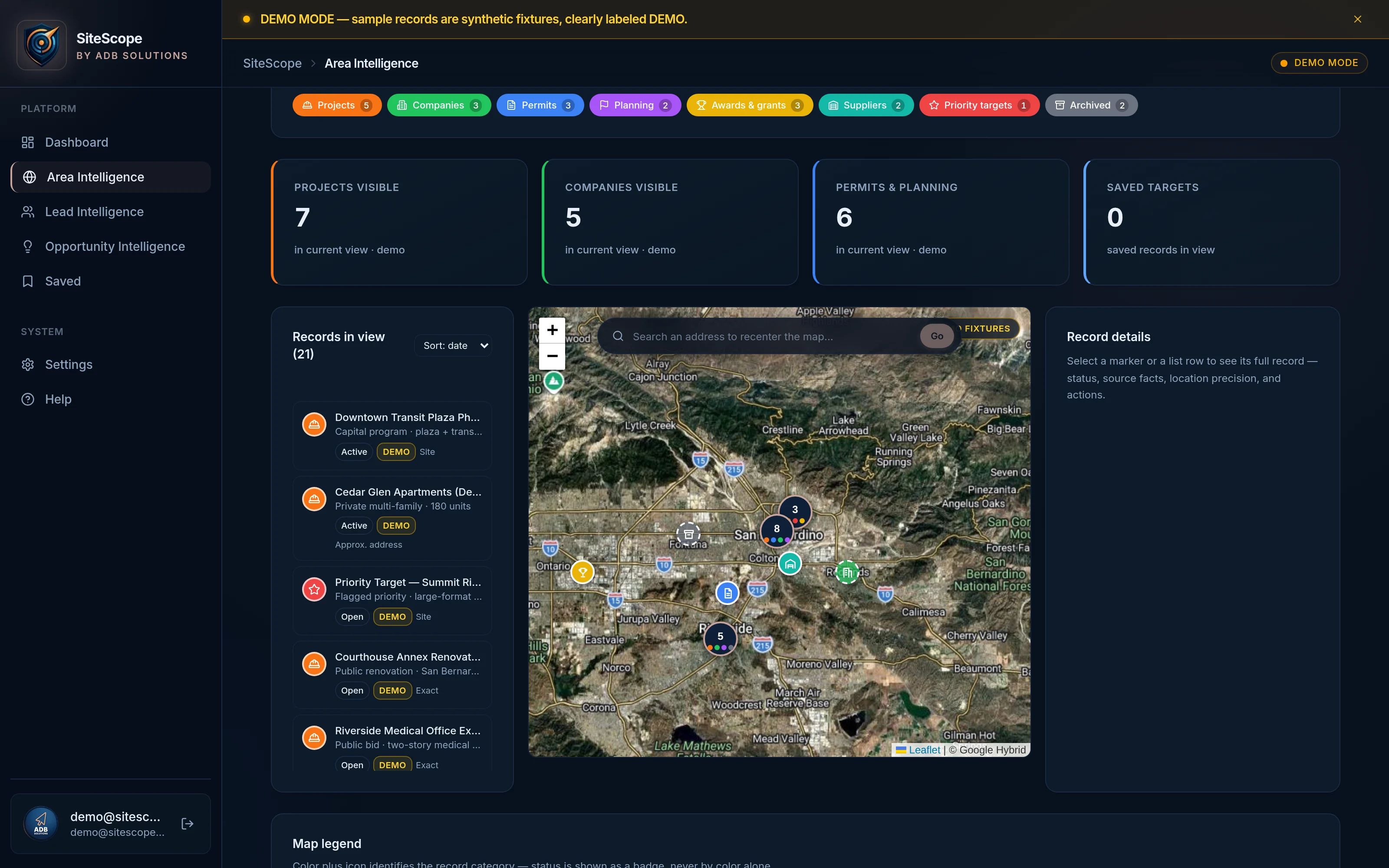
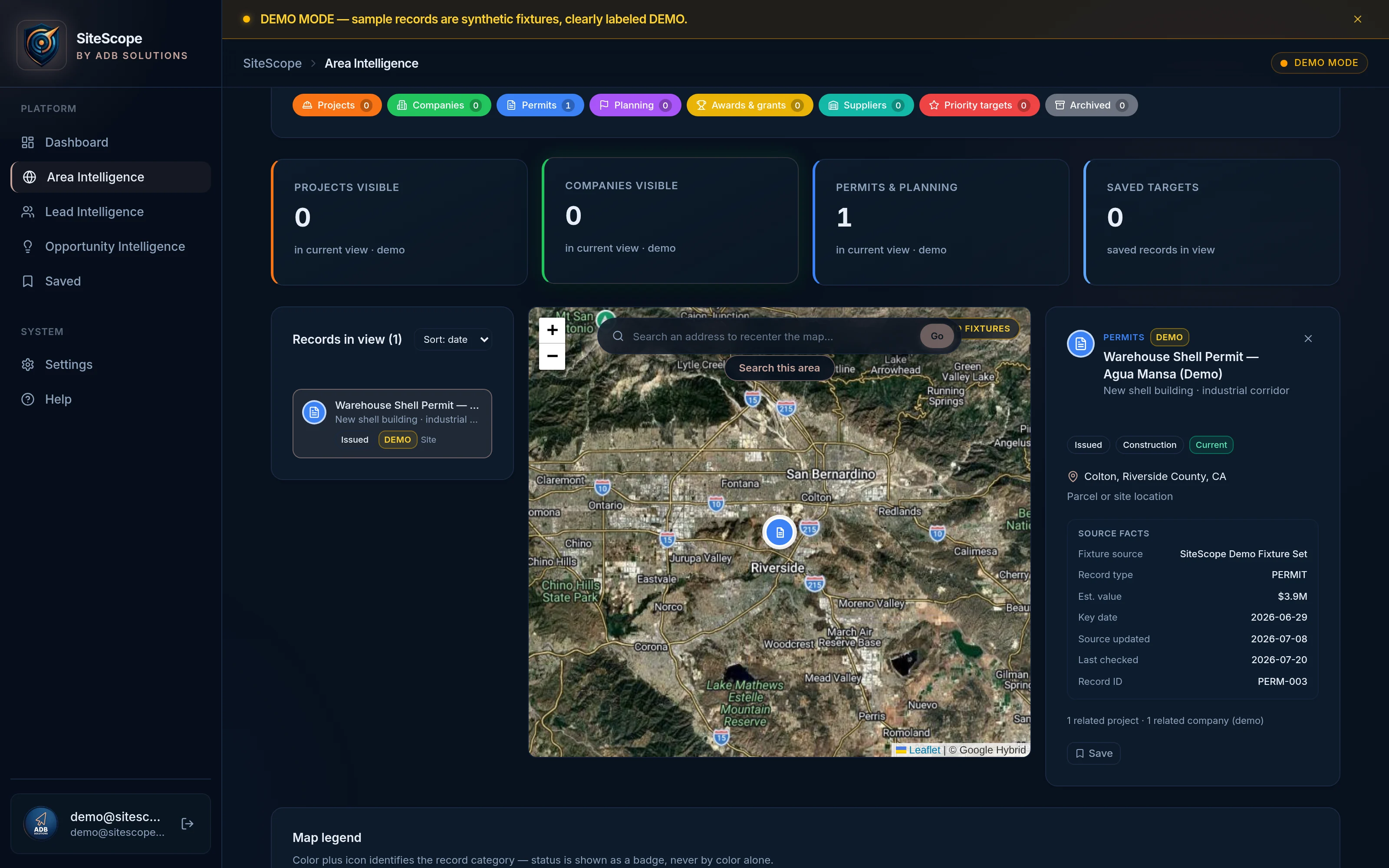
Area Intelligence is a visual construction-intelligence map for exploring public opportunities and records by city, ZIP code, county or geographic area.
Search an area, review relevant public construction records and understand where opportunities are being reported—all from one visual workspace.
- Explore by city, ZIP code, county or geographic area
- Review public opportunities and source-backed records
- Filter by category, status, agency and relevant dates
- See each record’s stated location precision
- Open the original public source when available
- Save opportunities and areas for follow-up
Every record shows the precision of its location — address, ZIP, city or county level. Map points may represent the center of a reported ZIP code, city or county and do not necessarily represent a verified construction-site location.
Public records, shown geographically and clearly labeled.
Search a city, ZIP code, county, or geographic area to see the public construction opportunities and records reported there — each with its source, its date, and a location-precision label.
- 1 Search a city, ZIP code, county, or geographic area
- 2 View relevant public opportunities and records
- 3 Review deadlines, agencies, status and available project information
- 4 Open the original public source
- 5 Save the opportunity or area for follow-up
Map points may represent the center of a reported ZIP code, city or county and do not necessarily represent a verified construction-site location.
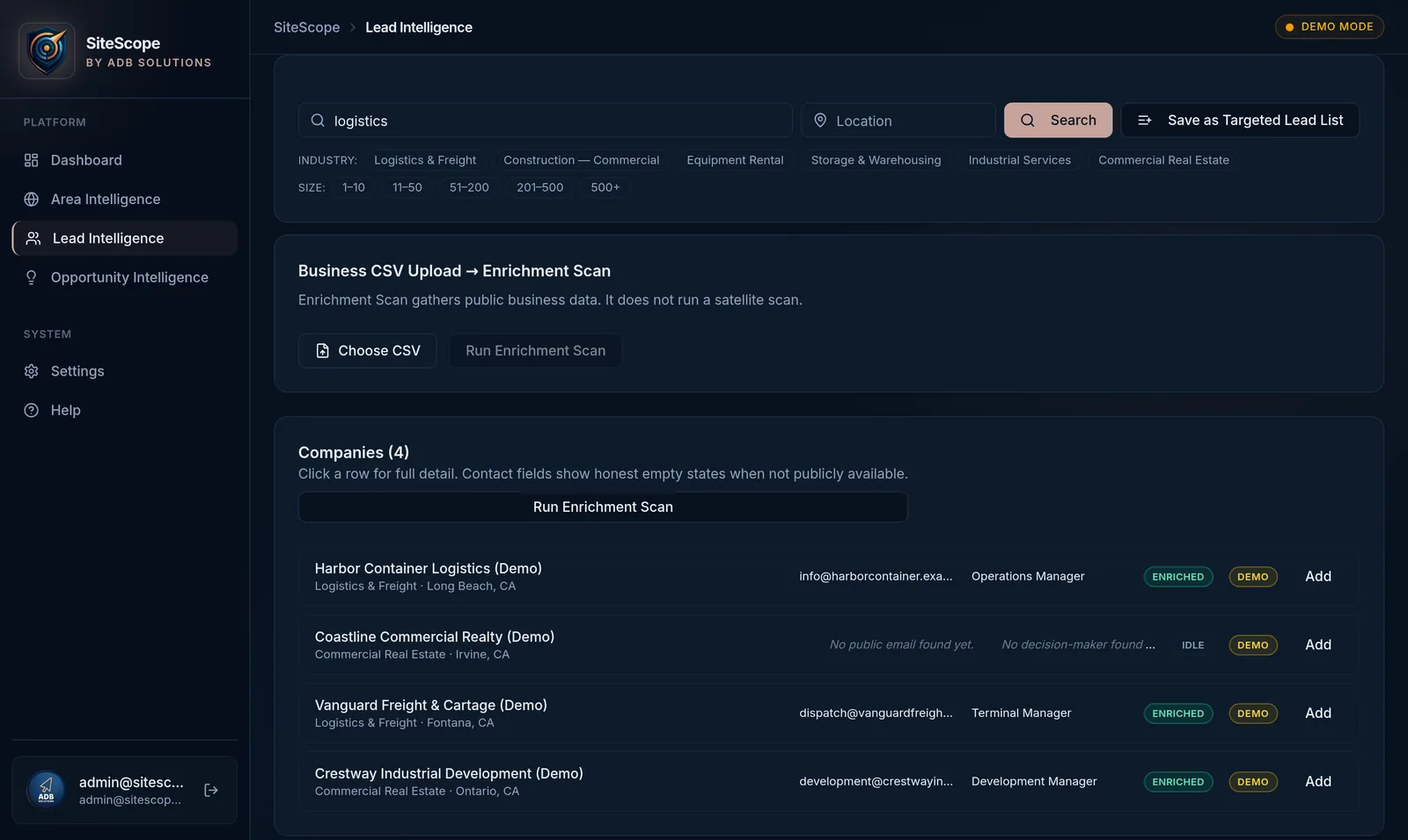
Find the companies and contacts connected to your market.
Search for companies and contacts, organize relevant prospects, enrich available business information, and export records for outreach or further research.
- Company search with industry and geographic filters
- Contact discovery from available public information
- Enrichment of available business details, including CSV list workflows
- CSV export and optional handoffs from Opportunity or Area Intelligence
Evidence behind the record.
SiteScope helps users understand where information came from, when it was published, and where additional verification can be completed. Select an example record to see the evidence view.
Public records always point back to the original source so details can be independently verified before acting.
Demonstration records are clearly labeled, carry no official source, and are never presented as active opportunities.
Information retrieved from an identifiable public source, shown with the source organization, dates, and an official link when available.
Synthetic, sample, or illustrative content used to demonstrate the product experience. Never presented as a live or active record.
Industries we support.
Teams that research public construction activity, geographic markets, and the companies connected to them.
General Contractors & Subcontractors
Find public project opportunities and organize deadlines, agencies, locations, and source information.
Construction Suppliers
Explore projects and territories where future material requirements may develop.
Equipment Rental Companies
Research public projects and geographic markets that may require equipment support.
Storage-Container & Mobile-Storage Companies
Research public construction activity and geographic expansion opportunities.
Logistics & Industrial Service Providers
Understand project locations and identify markets that may require operational support.
Commercial Real Estate Teams
Research geographic activity, public projects, and area context.
Territory-Based B2B Sales Teams
Organize geographic markets, relevant companies, public projects, and available contacts.
Why SiteScope can become a broader intelligence platform.
The strategic direction we are building toward.
Fragmented information
Public construction information is distributed across many systems and sources.
Geographic advantage
Location is essential to understanding projects, companies, markets, territories, and potential activity.
Modular expansion
Opportunity, Area, and Lead Intelligence create several product entry points and potential commercial pathways.
Compounding intelligence
Saved areas, tracked records, source histories, geographic relationships, and connected entities may become increasingly valuable as the platform develops.
An honest view of product maturity.
SiteScope is an early-stage platform. Here is what is available in the demo today, what is being validated, and what is planned.
Available in Demo
- Platform navigation and all three module interfaces
- Geographic exploration by city, ZIP code, county, or custom area
- Demonstration workflows in clearly labeled Demo Mode
- Saved opportunities and saved areas
- Saved-record concepts and export workflows
Being Validated
- Public-record source integrations (federal and regional pilot sources)
- Data normalization and record-refresh workflows
- Location matching and centroid-precision quality
- Contact enrichment quality
- Geographic matching accuracy
Planned
- Expanded public-source coverage
- Multi-tenant deployments and customer workspaces
- Automated record-change alerts
- Additional export options and customer integrations
- Customer-configurable research workflows
Advanced intelligence should still be understandable.
SiteScope is designed to make public information, AI-assisted observations, and source evidence easier to review—not to hide uncertainty behind an automated score.


Built from operational experience and a belief that better information creates better opportunities.
SiteScope is built by co-founders Austin Bryant and Axl Jon Dela Cruz.
Austin served four years in the United States Air Force before transitioning into entrepreneurship and technology, developing skills across IT, graphic design, software development, and artificial intelligence. He previously participated in developing a mobile application that later became part of a successful merger acquisition, and cofounded ADB Solutions to help businesses use technology and artificial intelligence more effectively. Today he leads the development and commercialization of SiteScope.
Axl Jon Dela Cruz is a full-stack software engineer and SiteScope co-founder focused on building reliable, scalable software products. His background includes enterprise SaaS, web development and third-party risk management systems. At SiteScope, he helps lead platform engineering, technical architecture and the delivery of secure, practical product experiences.
Building the intelligence layer for construction opportunity research.
SiteScope is developing a modular platform that combines public construction records, geographic context, company research, and available contacts in one visual workspace.
See how SiteScope fits your market.
Bring a location, public opportunity, target industry, or territory. We will show you how SiteScope can organize relevant information and support your research workflow.
Demos run in Demo Mode with clearly labeled sample data.